

A calorie calculator is a tool that estimates the number of calories your body needs each day to maintain, lose, or gain weight. Whether you want to shed a few pounds, build muscle, or simply eat more mindfully, understanding your personal calorie requirements is the foundation of any successful nutrition plan. But calories are not just about weight – they are units of energy that fuel every cell, muscle, and organ in your body. This guide explains what a calorie calculator does, how to use one correctly, the science behind it, and practical tips for integrating it into your daily life.
What Is a Calorie Calculator and How Does It Work?
A calorie calculator uses mathematical formulas to estimate your Total Daily Energy Expenditure (TDEE) – the total calories you burn in a day. It then adjusts that number based on your goal (weight loss, maintenance, or gain).
How TDEE Is Calculated
TDEE combines four components:
- BMR (Basal Metabolic Rate) – Calories burned at complete rest (breathing, heartbeat, body temperature).
- NEAT (Non-Exercise Activity Thermogenesis) – Calories from daily movements like walking, typing, or fidgeting.
- EAT (Exercise Activity Thermogenesis) – Calories burned during intentional exercise.
- TEF (Thermic Effect of Food) – Calories used to digest and process food (about 10% of total intake).
Most calculators first compute BMR using standard equations (Mifflin‑St Jeor, Harris‑Benedict, or Katch‑McArdle), then multiply by an activity factor to get TDEE.
Why Use a Calorie Calculator?
Using a calorie calculator provides several benefits beyond simple weight management.
- Personalized targets – No more guesswork. You get a number tailored to your age, sex, weight, height, and activity level.
- Weight loss clarity – Knowing your maintenance calories allows you to create a safe deficit (typically 300–500 calories per day) for steady fat loss.
- Muscle gain guidance – A surplus of 250–500 calories per day supports lean mass growth without excessive fat gain.
- Health awareness – Even if you don’t track every meal, knowing approximate needs helps you avoid undereating or overeating.
- Tracking progress – Compare your actual intake to your target to see if adjustments are needed.
How to Use a Calorie Calculator Step by Step
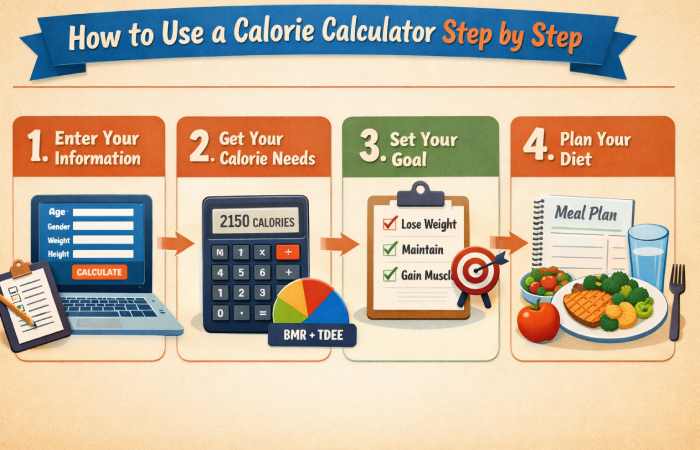
Follow these steps to get an accurate result and apply it to your routine.
Step 1: Gather Your Measurements
You will need:
- Age (years)
- Sex (male/female – calculators may use biological sex for BMR formulas)
- Weight (in kg or lbs)
- Height (in cm or inches)
- Activity level (sedentary, lightly active, moderately active, very active, extremely active)
Step 2: Choose a Reliable Calorie Calculator
Look for calculators that use the Mifflin‑St Jeor equation (considered most accurate for general populations) or the Katch‑McArdle (if you know your body fat percentage). Many free options exist online from reputable health sites.
Step 3: Input Your Data
Enter your numbers honestly. Overestimating activity level is a common mistake that leads to unrealistic calorie targets.
Step 4: Select Your Goal
- Weight loss – Subtract 300–500 calories from TDEE (or up to 1000 for aggressive loss under medical supervision).
- Weight maintenance – Eat at TDEE.
- Weight gain – Add 250–500 calories to TDEE.
Step 5: Apply the Result
Use the number as a starting point. Track your intake for 1–2 weeks using a food diary or app. Adjust by 100–200 calories if your weight does not change as expected.
Common Mistakes to Avoid When Using a Calorie Calculator
- Choosing the wrong activity level – “Moderately active” means exercise 3–5 days per week, not just a busy job.
- Forgetting to recalculate – As you lose or gain weight, your calorie needs change. Recalculate every 5–10 kg (10–20 lbs).
- Eating back all exercise calories – Many calculators already include activity. Adding extra can stall progress.
- Ignoring portion sizes – Even healthy foods can push you over your target if portions are too large.
Understanding the Science: BMR, TDEE, and Activity Factors
To use a calorie calculator effectively, you need to understand its building blocks.
Basal Metabolic Rate (BMR) Explained
BMR is the largest component of your daily burn (60–75%). It is influenced by:
- Muscle mass – More muscle increases BMR.
- Age – BMR declines about 1–2% per decade after 20.
- Sex – Males typically have higher BMR due to more muscle and larger body size.
- Genetics – Some people naturally have faster or slower metabolisms.
Activity Levels and Their Multipliers
Standard multipliers (Mifflin‑St Jeor):
| Activity Level | Description | Multiplier |
| Sedentary | Little or no exercise, desk job | 1.2 |
| Lightly active | Light exercise 1–3 days/week | 1.375 |
| Moderately active | Moderate exercise 3–5 days/week | 1.55 |
| Very active | Hard exercise 6–7 days/week | 1.725 |
| Extremely active | Physical job + intense daily training | 1.9 |
Calorie Calculator for Weight Loss
Losing weight requires a calorie deficit – consuming fewer calories than you burn. But the deficit must be sustainable.
How to Create a Safe Deficit
- Mild deficit (200–300 calories) – Slow loss (0.2–0.3 kg per week), easy to maintain.
- Moderate deficit (300–500 calories) – Standard recommendation (0.3–0.6 kg per week).
- Aggressive deficit (500–1000 calories) – Faster loss (0.5–1 kg per week), but risk of muscle loss, fatigue, and nutrient deficiencies. Consult a doctor.
Why Extremely Low Calories Backfire
Eating below 1200 calories (women) or 1500 calories (men) without medical supervision can:
- Slow down metabolism (adaptive thermogenesis)
- Cause muscle loss
- Lead to nutrient deficiencies
- Trigger binge eating
Always prioritize nutrient‑dense foods (vegetables, lean proteins, whole grains, healthy fats) within your calorie target.
Calorie Calculator for Weight Gain and Muscle Building
Gaining weight – especially lean muscle – requires a calorie surplus. But more is not always better.
Recommended Surplus for Lean Gain
- Beginner lifter – 300–400 calorie surplus supports muscle growth with minimal fat.
- Experienced lifter – 100–200 calorie surplus (muscle gain is slower).
- Dirty bulk (500+ surplus) – Leads to excessive fat gain, not recommended.
Combine Surplus with Resistance Training
Without exercise, extra calories become fat. Pair your surplus with strength training (3–5 sessions per week) to maximize muscle synthesis. Protein intake should be 1.6–2.2 g per kg of body weight.
Limitations of Calorie Calculators
Calorie calculators provide estimates, not perfect numbers. Be aware of these limitations:
- Individual variation – Two people with identical stats can have different metabolic rates due to genetics, hormones, and gut bacteria.
- Body composition – Muscle burns more calories than fat. Two people at the same weight but with different body fat % have different BMRs.
- Adaptive thermogenesis – When you lose weight, your body may reduce energy expenditure more than predicted.
- Activity factor subjectivity – People often misjudge their activity level.
Solution: Treat the calculator result as a starting point. Monitor your weight and energy levels for 1–2 weeks, then adjust by ±100–200 calories as needed.
Best Online Calorie Calculator Tools
| Tool | Best For | Key Features | Platform | Pricing |
| Cronometer | Data-Lovers & Accuracy | Verified nutrition database, detailed micronutrient tracking (vitamins & minerals), and good reliability and validity per research. | iOS, Android, Web | Free version / Cronometer Gold (Subscription) |
| Fitia | AI-Powered Coaching | 100% dietitian-verified food database, photo & voice logging, smart grocery lists, and automatic calorie/macro adjustments. | iOS, Android | Free version / Fitia Premium (Subscription) |
| MyFitnessPal | Huge Food Database | Massive crowd-sourced food library, extensive barcode scanner, and strong wearable integration. | iOS, Android, Web | Free version / Premium (Subscription) |
| Lose It! | User-Friendly Design | Clean, intuitive interface with a barcode scanner, goal setting, and a social/community component. | iOS, Android | Free version / Premium (Subscription) |
| FatSecret | Completely Free | A comprehensive 100% free calorie counter and diet tracker with a large food database and a supportive community forum. | iOS, Android, Web | Free |
| Noom | Behavioral Coaching | Combines calorie tracking with psychology-based articles, quizzes, and coaching to build long-term healthy habits. | iOS, Android | Paid Subscription (Typically 14-day trial) |
| YAZIO | Weight Loss & Fasting | User-friendly calorie counter with a built-in intermittent fasting tracker and a large database of international foods. | iOS, Android | Free version / YAZIO Pro (Subscription) |
| SnapCalorie | Photo Accuracy (AI) | Uses AI for scientific visual calorie estimation, aiming for high precision from food photos. | iOS | Free |
| Cal AI | Fast Photo Logging | Lightening-fast AI photo recognition for calorie counting, ideal for busy professionals. | iOS, Android | Free |
How to Track Your Calories Accurately
Using a calorie calculator is only half the battle – you also need to track what you eat.
Best Methods for Calorie Tracking
- Apps – MyFitnessPal, Cronometer, Lose It, FatSecret (scan barcodes, save meals).
- Food scale – Most accurate. Weigh solids in grams, liquids in ml.
- Measuring cups – Good for liquids and some dry goods, but less accurate than a scale.
- Portion estimation – Use your hand: palm = protein, fist = veggies, cupped hand = carbs, thumb = fats.
Common Tracking Errors
- Forgetting cooking oils, sauces, dressings, and drinks.
- Using generic entries instead of specific brands.
- Not weighing raw ingredients (cooked weights vary with water content).
- Ignoring “bite tests” or small snacks.
Calorie Calculator for Different Populations
Calorie needs vary by life stage and special conditions.
Calorie Calculator for Athletes
Athletes have higher energy demands. Standard calculators may underestimate because activity multipliers are too broad. Add 200–500 calories to the “very active” setting, or work with a sports dietitian.
Calorie Calculator for Seniors
After age 60, BMR declines. Older adults need fewer total calories but more protein (1.2–1.5 g per kg) to preserve muscle and bone health.
Calorie Calculator During Pregnancy and Breastfeeding
Pregnancy requires extra calories, especially in the second and third trimesters (about 300–500 extra calories per day). Breastfeeding adds 400–500 calories daily. Always consult an OB‑GYN – do not restrict calories while pregnant.
Frequently Asked Questions
Q1: Are calorie calculators accurate for everyone?
No, they give estimates. People with hormonal disorders (thyroid, PCOS), low muscle mass, or metabolic adaptations may need personalized adjustments.
Q2: Should I eat exactly the number the calculator gives me?
Use it as a target ±50–100 calories. Consistency matters more than perfection.
Q3: Do I need to count calories forever?
No. Many people count for a few weeks to learn portion sizes, then switch to intuitive eating or hand‑portion methods.
Q4: Can I use a calorie calculator if I have diabetes?
Yes, but focus on carbohydrate quality and distribution, not just total calories. Work with a dietitian.
Q5: Why does my weight stay the same even though I eat at a deficit?
Possible reasons: water retention, inaccurate tracking, overestimating activity, or metabolic slowdown. Recalculate after 2–3 weeks and ensure you are using a food scale.
Q6: Is it safe to go below 1200 calories?
Only under strict medical supervision. Very low-calorie diets can cause gallstones, heart rhythm issues, and nutrient deficiencies.
Q7: Do calorie calculators work for intermittent fasting?
Yes. Total daily calories matter regardless of meal timing. The calculator does not change with fasting schedules.
Q8: How often should I recalculate my calorie needs?
Every 5–10 kg (10–20 lbs) of weight change, or when your activity level changes significantly.
Conclusion
A calorie calculator is a powerful starting point for anyone looking to understand their energy balance – whether for weight loss, muscle gain, or simply maintaining a healthy lifestyle. By providing a personalized estimate of your total daily energy expenditure, it removes guesswork and gives you a clear target to aim for.
However, remember that calculators are tools, not crystal balls. Your actual calorie needs may vary due to genetics, body composition, and lifestyle. The key is to treat the calculator’s output as an initial benchmark, then track your progress and make small adjustments. Combine this knowledge with whole, nutrient‑dense foods, regular physical activity, and good sleep for the best results.
Whether you are a beginner or a fitness enthusiast, mastering the basics of calorie balance will empower you to make informed decisions about your diet – without obsession or fear. Start today by calculating your TDEE, setting a realistic goal, and taking the first step toward a healthier relationship with food.